
Note
Go to the end to download the full example code.
Polars LazyFrame to ONNX#
lazyframe_to_onnx() converts a polars.LazyFrame
directly into a self-contained onnx.ModelProto. Internally the
function calls polars.LazyFrame.explain() to obtain the logical
execution plan, translates it into a SQL query, and then delegates to
sql_to_onnx().
Each source column becomes a separate 1-D ONNX input tensor; the
outputs correspond to the expressions in the select (or agg) step.
This example covers:
Basic SELECT — column pass-through and arithmetic expressions.
WHERE clause — row filtering with comparison predicates.
Aggregations —
sum(),mean(),min(),max().Filter + arithmetic combined — chaining
filterandselect.Graph visualization — inspecting the produced ONNX model.
See SQL queries to ONNX for the lower-level SQL → ONNX API.
import numpy as np
import onnxruntime
import polars as pl
from yobx.helpers.onnx_helper import pretty_onnx
from yobx.sql import lazyframe_to_onnx
1. Basic SELECT — arithmetic expression#
The simplest case: select a computed column from two source columns.
input_dtypes maps each source column name to its numpy dtype;
only columns that actually appear in the plan need to be listed.
lf_add = pl.LazyFrame({"a": [1.0, 2.0, 3.0], "b": [4.0, 5.0, 6.0]})
lf_add = lf_add.select([(pl.col("a") + pl.col("b")).alias("total")])

dtypes = {"a": np.float64, "b": np.float64}
artifact_add = lazyframe_to_onnx(lf_add, dtypes)

a = np.array([1.0, 2.0, 3.0], dtype=np.float64)
b = np.array([4.0, 5.0, 6.0], dtype=np.float64)
sess = onnxruntime.InferenceSession(
    artifact_add.SerializeToString(), providers=["CPUExecutionProvider"]
)
(total,) = sess.run(None, {"a": a, "b": b})
print("a + b =", total)
np.testing.assert_allclose(total, a + b)
a + b = [5. 7. 9.]
The ONNX model
print(pretty_onnx(artifact_add.proto))
opset: domain='' version=21
input: name='a' type=dtype('float64') shape=['N']
input: name='b' type=dtype('float64') shape=['N']
Add(a, b) -> total
output: name='total' type='NOTENSOR' shape=None
2. WHERE clause — row filtering#
filter is translated to a boolean mask followed by Compress nodes
that select only the matching rows from every output column.
lf_where = pl.LazyFrame({"a": [1.0, 2.0, 3.0], "b": [4.0, 5.0, 6.0]})
lf_where = lf_where.filter(pl.col("a") > 1.5).select([pl.col("a"), pl.col("b")])

artifact_where = lazyframe_to_onnx(lf_where, dtypes)
sess = onnxruntime.InferenceSession(
    artifact_where.SerializeToString(), providers=["CPUExecutionProvider"]
)
a_filt, b_filt = sess.run(None, {"a": a, "b": b})

print("rows where a > 1.5:")
print("  a =", a_filt)
print("  b =", b_filt)
np.testing.assert_allclose(a_filt, np.array([2.0, 3.0]))
rows where a > 1.5:
  a = [2. 3.]
  b = [5. 6.]
The ONNX model
print(pretty_onnx(artifact_where.proto))
opset: domain='' version=21
input: name='a' type=dtype('float64') shape=['N']
input: name='b' type=dtype('float64') shape=['N']
init: name='filter_mask_r_lit' type=float32 shape=(1,) -- array([1.5], dtype=float32)
CastLike(filter_mask_r_lit, a) -> _onx_castlike_filter_mask_r_lit
  Greater(a, _onx_castlike_filter_mask_r_lit) -> _onx_greater_a
    Compress(a, _onx_greater_a, axis=0) -> output_0
Compress(b, _onx_greater_a, axis=0) -> output_1
output: name='output_0' type='NOTENSOR' shape=None
output: name='output_1' type='NOTENSOR' shape=None
3. Aggregation functions#
Polars aggregation methods — sum(), mean() (→ AVG), min(),
max() — are mapped to the corresponding ReduceSum, ReduceMean,
ReduceMin, and ReduceMax ONNX nodes.
lf_agg = pl.LazyFrame({"a": [1.0, 2.0, 3.0], "b": [4.0, 5.0, 6.0]})
lf_agg = lf_agg.select([pl.col("a").sum().alias("s"), pl.col("b").mean().alias("m")])

dtypes_agg = {"a": np.float64, "b": np.float64}
artifact_agg = lazyframe_to_onnx(lf_agg, dtypes_agg)
sess = onnxruntime.InferenceSession(
    artifact_agg.SerializeToString(), providers=["CPUExecutionProvider"]
)
s_arr, m_arr = sess.run(None, {"a": a, "b": b})
s = float(s_arr)
m = float(m_arr)

print(f"sum(a)  = {s:.1f}  (expected 6.0)")
print(f"mean(b) = {m:.1f}  (expected 5.0)")
assert abs(s - 6.0) < 1e-5
assert abs(m - 5.0) < 1e-5
sum(a)  = 6.0  (expected 6.0)
mean(b) = 5.0  (expected 5.0)
The ONNX model
print(pretty_onnx(artifact_agg.proto))
opset: domain='' version=21
input: name='a' type=dtype('float64') shape=['N']
input: name='b' type=dtype('float64') shape=['N']
init: name='select_s_axes' type=int64 shape=(1,) -- array([0])
ReduceMean(b, select_s_axes, keepdims=0) -> m
ReduceSum(a, select_s_axes, keepdims=0) -> s
output: name='s' type='NOTENSOR' shape=None
output: name='m' type='NOTENSOR' shape=None
4. Filter + arithmetic combined#
Filters and computed expressions can be chained freely. Here we keep only
rows where a > 0 and then compute a + b for those rows.
lf_combined = pl.LazyFrame({"a": [1.0, 2.0, 3.0], "b": [4.0, 5.0, 6.0]})
lf_combined = lf_combined.filter(pl.col("a") > 0).select(
    [(pl.col("a") + pl.col("b")).alias("total")]
)

a2 = np.array([1.0, -2.0, 3.0], dtype=np.float64)
b2 = np.array([4.0, 5.0, 6.0], dtype=np.float64)

artifact_combined = lazyframe_to_onnx(lf_combined, dtypes)
sess = onnxruntime.InferenceSession(
    artifact_combined.SerializeToString(), providers=["CPUExecutionProvider"]
)
(total2,) = sess.run(None, {"a": a2, "b": b2})
print("(a + b) WHERE a > 0 =", total2)
np.testing.assert_allclose(total2, np.array([5.0, 9.0]))
(a + b) WHERE a > 0 = [5. 9.]
The ONNX model
print(pretty_onnx(artifact_combined.proto))
opset: domain='' version=21
input: name='a' type=dtype('float64') shape=['N']
input: name='b' type=dtype('float64') shape=['N']
init: name='filter_mask_r_lit' type=float32 shape=(1,) -- array([0.], dtype=float32)
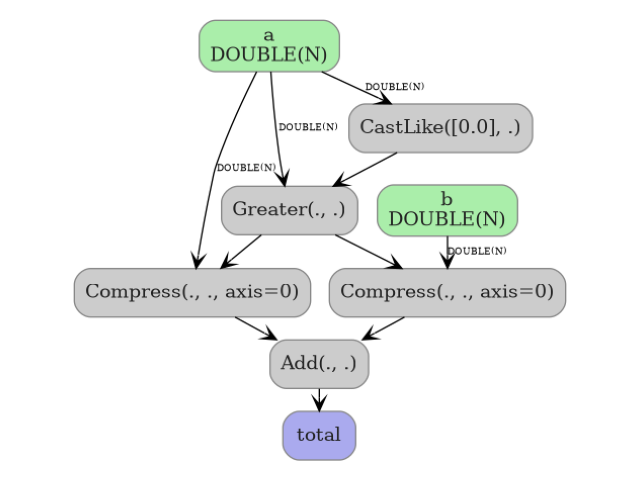
CastLike(filter_mask_r_lit, a) -> _onx_castlike_filter_mask_r_lit
  Greater(a, _onx_castlike_filter_mask_r_lit) -> _onx_greater_a
    Compress(a, _onx_greater_a, axis=0) -> _onx_compress_a
Compress(b, _onx_greater_a, axis=0) -> _onx_compress_b
  Add(_onx_compress_a, _onx_compress_b) -> total
output: name='total' type='NOTENSOR' shape=None
5. Visualise the ONNX node types#
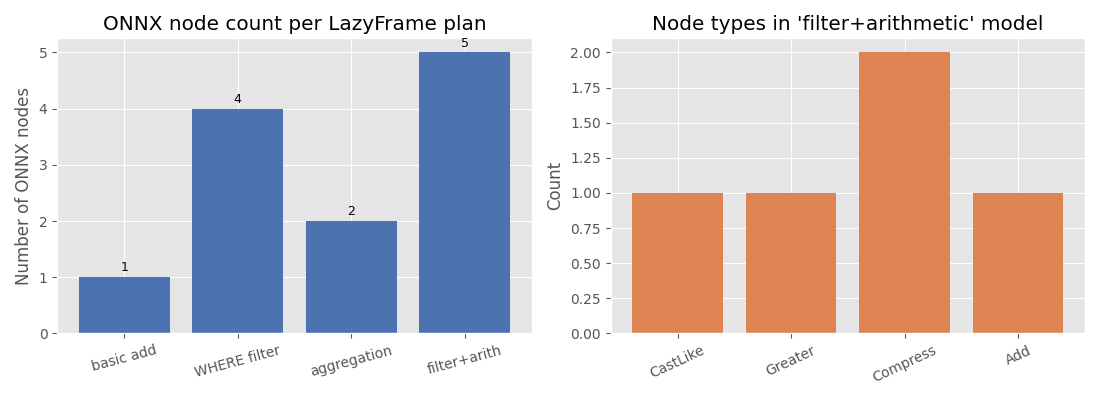
The bar chart below compares how many ONNX nodes each LazyFrame plan produces and which node types appear in the combined filter+arithmetic model.
import matplotlib.pyplot as plt  # noqa: E402

models = {
    "basic add": artifact_add.proto,
    "WHERE filter": artifact_where.proto,
    "aggregation": artifact_agg.proto,
    "filter+arith": artifact_combined.proto,
}

node_counts = [len(list(m.graph.node)) for m in models.values()]

fig, axes = plt.subplots(1, 2, figsize=(11, 4))

# Left: node count per LazyFrame plan
ax = axes[0]
bars = ax.bar(list(models.keys()), node_counts, color="#4c72b0")
ax.set_ylabel("Number of ONNX nodes")
ax.set_title("ONNX node count per LazyFrame plan")
for bar, count in zip(bars, node_counts):
    ax.text(
        bar.get_x() + bar.get_width() / 2,
        bar.get_height() + 0.05,
        str(count),
        ha="center",
        va="bottom",
        fontsize=9,
    )
ax.tick_params(axis="x", labelrotation=15)

# Right: node types in the combined filter+arithmetic model
op_types: dict[str, int] = {}
for node in artifact_combined.proto.graph.node:
    op_types[node.op_type] = op_types.get(node.op_type, 0) + 1

ax2 = axes[1]
ax2.bar(list(op_types.keys()), list(op_types.values()), color="#dd8452")
ax2.set_ylabel("Count")
ax2.set_title("Node types in 'filter+arithmetic' model")
ax2.tick_params(axis="x", labelrotation=25)

plt.tight_layout()
plt.show()
6. Display the ONNX model graph#
plot_dot() renders the ONNX graph as an image so you can
inspect nodes, edges, and tensor shapes at a glance. Here we visualize the
combined filter + arithmetic model.
from yobx.doc import plot_dot  # noqa: E402

plot_dot(artifact_combined.proto)
Total running time of the script: (0 minutes 0.868 seconds)
Related examples
Three Consecutive Joins to ONNX (pandas and polars-style)