Note
Go to the end to download the full example code.
Using sklearn-onnx to convert any scikit-learn estimator#
yobx.sklearn.to_onnx() ships with built-in converters for a curated
set of scikit-learn estimators (StandardScaler,
LogisticRegression, DecisionTree*, MLP*, and Pipeline).
For any estimator that is not covered by the built-in registry, you can
supply your own converter through the extra_converters keyword argument.
This example shows how to write such a custom converter for
MLPClassifier using
sklearn-onnx (skl2onnx) as the conversion back-end. The
approach generalises to any scikit-learn estimator that skl2onnx
supports.
The strategy#
Call
skl2onnx.convert_sklearn()to obtain a self-containedonnx.ModelProtofor the estimator alone.Wrap that sub-model as a local ONNX function inside the enclosing
GraphBuilderusingFunctionOptions. The function groups the MLP nodes under a single named call during graph construction, and its weight tensors are stored asConstantnodes inside the function body rather than as top-level graph initializers.Emit a
make_nodecall for the freshly registered function so the MLP plugs into the rest of the pipeline graph.
The yobx optimizer (invoked by yobx.sklearn.to_onnx() at export
time) inlines local functions into the enclosing graph, so the final
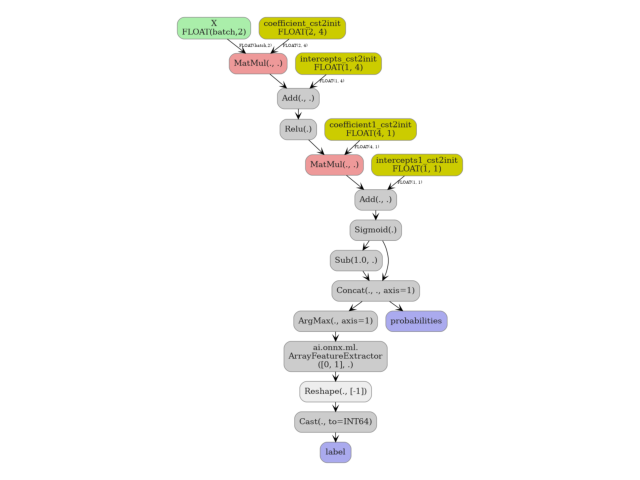
onnx.ModelProto contains the individual MatMul, Add,
Relu, and Sigmoid nodes rather than a single call-node. The
local-function wrapping is therefore a construction-time organisational
pattern that keeps converter code clean and composable even when the
emitted sub-graph is ultimately inlined.
from typing import Dict, List, Tuple
import numpy as np
import onnx
import onnxruntime
from sklearn.neural_network import MLPClassifier
from skl2onnx import convert_sklearn
from skl2onnx.common.data_types import DoubleTensorType, FloatTensorType
from yobx import doc
from yobx.typing import GraphBuilderExtendedProtocol
from yobx.xbuilder import FunctionOptions
from yobx.sklearn import to_onnx
Helper: map ONNX element type to a skl2onnx input-type descriptor#
skl2onnx.convert_sklearn() requires an initial_types list that
describes the shape and dtype of each model input using skl2onnx
type objects such as FloatTensorType.
The helper below translates an ONNX elem_type integer (as returned by
get_type()) into the matching skl2onnx
descriptor.
def to_skl2onnx_input_type(elem_type: int, n_features: int):
"""
Convert an ONNX ``TensorProto`` element-type code into the matching
:epkg:`sklearn-onnx` input-type object.
:param elem_type: ONNX element type integer (e.g.
``onnx.TensorProto.FLOAT == 1``).
:param n_features: number of input features (second dimension of the
2-D feature matrix).
:return: a skl2onnx type descriptor suitable for ``initial_types``.
:raises NotImplementedError: for element types other than ``FLOAT``
and ``DOUBLE``.
"""
if elem_type == onnx.TensorProto.FLOAT:
return FloatTensorType([None, n_features])
if elem_type == onnx.TensorProto.DOUBLE:
return DoubleTensorType([None, n_features])
raise NotImplementedError(
f"Input elem_type {elem_type} is not supported. "
"Only FLOAT (1) and DOUBLE (11) are supported by the skl2onnx MLP converter."
)
Custom converter: MLPClassifier via skl2onnx + local function#
A yobx converter is a plain Python function that receives the active
GraphBuilder, a shape-tracking dict (sts), the
desired output tensor names, the fitted estimator, and the name of the
input tensor already present in the graph. It must emit all necessary
ONNX nodes into g and return the name(s) of the produced output tensors.
Here we implement this contract by:
Asking skl2onnx to convert the estimator to a stand-alone ONNX model (
zipmap=Falseso probabilities come out as a plain float tensor instead of a sequence-of-maps).Fixing the opset version in the generated model to match the opset already in use by the enclosing graph — skl2onnx may pick a lower version than the one we need.
Loading the generated model into a temporary
GraphBuilder, then registering it as a local ONNX function in the enclosing graph viaFunctionOptions.Emitting a single call-node for that function.
def convert_sklearn_mlp_classifier(
g: GraphBuilderExtendedProtocol,
sts: Dict,
outputs: List[str],
estimator: MLPClassifier,
X: str,
name: str = "mlp_classifier",
) -> Tuple[str, str]:
"""
Convert a fitted :class:`~sklearn.neural_network.MLPClassifier` into
ONNX nodes inside an existing :class:`~yobx.xbuilder.GraphBuilder`.
The conversion delegates to :func:`skl2onnx.convert_sklearn` for the
actual graph construction, wraps the result in a local ONNX function
to keep the converter code composable, and emits a single call-node
for that function. The yobx optimizer will inline the function when
:func:`~yobx.sklearn.to_onnx` finalises the model.
:param g: the :class:`~yobx.xbuilder.GraphBuilder` that is currently
being populated.
:param sts: shape-tracking dictionary populated by the yobx converter
framework (passed through unchanged).
:param outputs: list of desired output tensor names
``[label, probabilities]``.
:param estimator: a fitted ``MLPClassifier`` instance.
:param X: name of the input tensor already present in *g*.
:param name: base name used for the emitted call-node.
:return: tuple ``(label_name, probabilities_name)`` — the names of the
two output tensors in *g*.
"""
assert isinstance(
estimator, MLPClassifier
), f"Unexpected type {type(estimator)} for estimator."
assert g.has_type(X), f"Missing type for {X!r}{g.get_debug_msg()}"
itype = g.get_type(X)
n_features = estimator.coefs_[0].shape[0]
# Step 1 — obtain a stand-alone ONNX model from skl2onnx.
# ``zipmap=False`` makes the probability output a plain [N, n_classes]
# float tensor instead of the default sequence-of-maps representation.
onx = convert_sklearn(
estimator,
initial_types=[("X", to_skl2onnx_input_type(itype, n_features))],
options={"zipmap": False},
target_opset=g.main_opset,
)
# Step 2 — normalise the opset version.
# skl2onnx may select a lower opset than the one required by the
# enclosing graph (it picks the lowest version whose op-set covers
# every node it emitted). Overwrite it so the sub-model is compatible.
del onx.opset_import[:]
d = onx.opset_import.add()
d.domain = ""
d.version = g.main_opset
# Step 3 — load the sub-model into a temporary GraphBuilder, then
# register it as a local ONNX function inside *g*.
# ``move_initializer_to_constant=True`` converts weight initializers
# into ``Constant`` nodes so they travel with the function definition
# rather than being stored as top-level graph initializers.
builder = g.__class__(onx)
f_options = FunctionOptions(
export_as_function=True,
name=g.unique_function_name("MLPClassifier"),
domain="sklearn_onnx_functions",
move_initializer_to_constant=True,
)
g.make_local_function(builder, f_options)
# Step 4 — emit a single call-node for the registered function.
return g.make_node(f_options.name, [X], outputs, domain=f_options.domain, name=name)
1. Train a simple MLPClassifier#
We use a tiny dataset (four samples, two features, binary labels) so the example runs instantly. The same API works for larger datasets and deeper networks.
X = np.array([[1, 2], [3, 4], [5, 6], [7, 8]], dtype=np.float32)
y = np.array([0, 0, 1, 1])
mlp = MLPClassifier(hidden_layer_sizes=(4,), activation="relu", random_state=0, max_iter=2000)
mlp.fit(X, y)
print("MLPClassifier architecture:")
print(f" hidden layers : {mlp.hidden_layer_sizes}")
print(f" activation : {mlp.activation}")
print(f" n_layers_ : {mlp.n_layers_}")
MLPClassifier architecture:
hidden layers : (4,)
activation : relu
n_layers_ : 3
2. Convert to ONNX using the custom converter#
We pass our custom converter function through extra_converters.
The yobx framework will call it whenever it encounters an
MLPClassifier instance while traversing the estimator (or pipeline).
onx = to_onnx(mlp, (X,), extra_converters={MLPClassifier: convert_sklearn_mlp_classifier})
print("\nTop-level graph nodes:")
for node in onx.graph.node:
print(f" op_type={node.op_type!r} domain={node.domain!r} name={node.name!r}")
print("\nLocal functions defined in the model:")
for func in onx.functions:
print(f" {func.domain}::{func.name} ({len(func.node)} nodes)")
Top-level graph nodes:
op_type='MatMul' domain='' name='MatMul'
op_type='Add' domain='' name='Add'
op_type='Relu' domain='' name='Relu'
op_type='MatMul' domain='' name='MatMul1'
op_type='Add' domain='' name='Add1'
op_type='Sigmoid' domain='' name='Relu1'
op_type='Sub' domain='' name='Sub'
op_type='Concat' domain='' name='Concat'
op_type='ArgMax' domain='' name='ArgMax'
op_type='ArrayFeatureExtractor' domain='ai.onnx.ml' name='ArrayFeatureExtractor'
op_type='Reshape' domain='' name='Reshape'
op_type='Cast' domain='' name='Cast1'
Local functions defined in the model:
3. Run with ONNX Runtime and verify#
We execute the exported model with onnxruntime and compare its predictions to scikit-learn’s. Both the class labels and the class-probability matrix must match within floating-point tolerance.
ref = onnxruntime.InferenceSession(onx.SerializeToString(), providers=["CPUExecutionProvider"])
results = ref.run(None, {"X": X})
label_onnx, proba_onnx = results[0], results[1]
label_sk = mlp.predict(X)
proba_sk = mlp.predict_proba(X)
print("\nPredicted labels (sklearn):", label_sk)
print("Predicted labels (ONNX) :", label_onnx)
np.testing.assert_array_equal(label_sk, label_onnx)
np.testing.assert_allclose(proba_sk, proba_onnx, atol=1e-5)
print("\nAll predictions match ✓")
Predicted labels (sklearn): [0 0 1 1]
Predicted labels (ONNX) : [0 0 1 1]
All predictions match ✓
4. Visualise the exported ONNX graph#
yobx.doc.plot_dot() renders the onnx.ModelProto as a
directed graph using Graphviz. The yobx optimizer inlines the local
function during export, so the graph shows the individual MatMul,
Add, Relu, and Sigmoid nodes that make up the MLP rather
than a single call-node.
doc.plot_dot(onx)

Total running time of the script: (0 minutes 0.923 seconds)
Related examples
Exporting sklearn estimators as ONNX local functions